3 equalizer modes
Basic for quick bass/mid/treble, Advanced 10-band with presets, Expert parametric for full control.
DJ Equalizer is the system-wide equalizer macOS never shipped. Tune Spotify, YouTube, Netflix, Zoom and games at once — boost volume to 200%, set volume per app, and drop in studio sound modes.
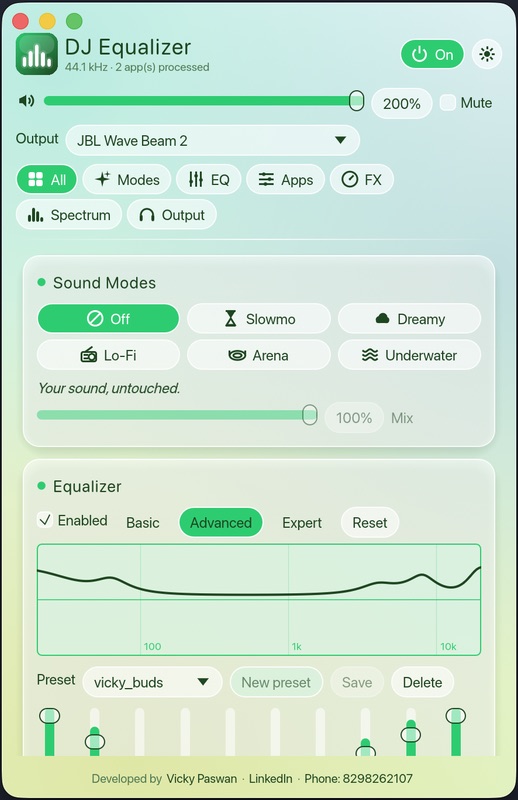
Max volume and the podcast is still a whisper. DJ Equalizer pushes to 200% with a limiter that stops distortion.
Spotify's EQ doesn't touch YouTube. Apple Music's doesn't touch Chrome. One EQ for the whole Mac fixes all of them.
A loud Zoom call over quiet music? Set a separate volume for every app from the per-app mixer.
This is the actual app, not a mockup. Tap a screen, and flip between the day and night glass themes.
The same 10-band curve you get in the app. Pick a preset or drag your own.
Start from a preset, tweak, and save your own — like vicky_buds in the screenshot.
Built in Rust on Apple's Core Audio. Nothing is allocated on the audio thread, so playback doesn't stutter.
Basic for quick bass/mid/treble, Advanced 10-band with presets, Expert parametric for full control.
Make MacBook speakers and AirPods louder, with a peak limiter that keeps it clean.
Turn Spotify down and Zoom up independently. Each app gets its own fader.
Slowmo, Dreamy, Lo-Fi, Arena and Underwater, with a wet/dry mix slider.
Small Room through Cathedral reverb, echo and pitch shift. Load your own Audio Unit plug-ins.
See your audio across the frequency range in real time while you tune.
Speakers, AirPods, Bluetooth speakers, USB DACs. Switch output from inside the app.
Close the window and it keeps working from the menu bar. One click to turn it on or off.
A frosted-glass interface that switches between light and dark with an animated transition.
Slowed + reverb, for any track
Soft, wide, floating
Warm vintage radio
Big live-stadium space
Muffled, deep, immersive
Enter your name and email, then pay $19 with PayPal or a debit/credit card.
Your license key and download appear right after paying. Drag the app into Applications and paste the key.
Allow System Audio Recording when macOS asks. Every app now goes through your EQ.
| Feature | DJ Equalizer | macOS built-in | In-app EQs (Spotify, Music) |
|---|---|---|---|
| EQ for every app at once | ✓ | — | Only that app |
| Volume above 100% | ✓ 200% | — | — |
| Per-app volume | ✓ | — | — |
| Parametric (Expert) EQ | ✓ | — | — |
| Sound modes and reverb | ✓ | — | — |
| Audio Unit plug-ins | ✓ | — | — |
| No audio driver to install | ✓ | ✓ | ✓ |
| Price | $19 once | Free | Included |
No subscription and no monthly bill.
 DJ Equalizer for Mac
Questions before buying? Message the developer.
Yes. DJ Equalizer is system-wide: it processes the audio of every app on your Mac — Spotify, Apple Music, YouTube in Safari or Chrome, Netflix, Zoom, games — in real time.
macOS 14.4 (Sonoma) or later, on Apple Silicon or Intel. DJ Equalizer uses Apple's Core Audio process taps, which arrived in macOS 14.4.
No. You pay $19 once and the app is yours. No subscription, no ads, and no account to set up: just your name and email.
No kernel extension or virtual audio driver. On first launch macOS asks for System Audio Recording permission; allow it and you're done.
Yes. The volume booster goes up to 200%, with a built-in peak limiter so loud audio doesn't distort or clip.
Right after PayPal confirms your payment, your license key and download button appear on this page. We also email you a sign-in link to your account, where you can download again any time. Unzip the app, drag DJ Equalizer to Applications, open it and paste your key. If macOS says it can't verify the developer, right-click the app and choose Open the first time.
Each license works on 2 Macs. Remove a Mac from your account at any time to move the license to a new one.
The audio engine is native Rust and allocates nothing on the audio thread, so it stays light. When you close the window it runs quietly from the menu bar.
One payment, every app, all your audio sounding the way you want.
Get DJ Equalizer — $19